
CollabMind
Overview
Collbamind is a specialized project management platform tailored to the unique workflows of interior architects and design professionals. It bridges the gap between design vision and execution by offering tools for project organization, client collaboration, and real-time communication—all in one place.
As the sole UX/UI designer, I led the end-to-end design process, from branding and visual identity to the web application UI, admin dashboard, and marketing site. The challenge was to create an intuitive experience for four distinct user types, each with different permissions and roles, while maintaining a cohesive and user-friendly interface throughout.
Collbamind is more than a task tracker—it’s a visual workspace that empowers designers to collaborate effectively, stay organized, and bring their ideas to life.
Role
Solo UX/UI Designer
Timeline
12 months
Tools
Figma
Illustrator

Challenges
1 / Designing for Multiple User Roles
Collbamind supports four distinct user types, each with their own permissions, workflows, and goals. Creating a clear, intuitive experience for all roles without cluttering the interface was a key challenge.
2 / Bridging Creative and Operational Needs
Interior architects often juggle creative ideation with logistical execution. The platform needed to support visual thinking and detailed task management simultaneously, requiring a thoughtful blend of design and structure.
3 / Keeping Communication Centralized
Client and team communication can easily become fragmented across email, spreadsheets, and messages. One of the biggest challenges was building a centralized, organized communication flow that still felt flexible and natural to use.
4 / Visualizing Complex Project Data Simply
Design projects often involve layered timelines, phases, and deliverables. Making this information visually accessible and easy to navigate, without overwhelming the user, was a crucial part of the UX strategy.
5 / Creating a Unified Experience Across Admin and Marketing Touchpoints
The product includes both an internal admin platform and an external promotional site. Ensuring a consistent brand voice and design language across all user-facing components was essential to support trust and usability.

Branding & Visual Identity
The visual identity for Collbamind was inspired by the refined, textural world of interior architecture—blending structure, creativity, and calm. The logomark merges architectural geometry with a stylized lightbulb, representing clarity, creativity, and collaboration at the core of the product.
Drawing from the moodboard’s soft curves, archways, and earthy tones, the color palette uses muted greens, warm neutrals, and desaturated pinks to reflect a space that feels both modern and grounded. Typography is clean and architectural, creating a balance between precision and warmth.
From UI components to social media visuals, the branding system is designed to feel thoughtful, consistent, and visually aligned with the lifestyle and aesthetic sensibilities of interior design professionals.





Mobile App & Core Features
1 / Project & User Management
Users can create and manage multiple projects, each with clearly defined roles such as collaborators, clients, or vendors. Role-based permissions ensure everyone sees only what they need, helping reduce noise and maintain focus. Projects are visually organized, with real-time status indicators and summaries that keep the entire team aligned from day one. Whether managing a single client or a full studio portfolio, users can easily navigate between projects with consistent structure. This core system lays the foundation for accountability, transparency, and efficiency across the app.
2 / Dream Phase Tools
In the Dream phase, ideas take shape. Designers and clients can upload inspiration images, sketches, and early references directly from their devices to build a shared creative direction. This space encourages exploration, collaboration, and alignment—without the pressure of tasks or deadlines. All uploaded content is automatically organized within each project, giving users a visual archive to draw from later. It’s a flexible, lightweight way to gather early-stage ideas and start building design trust between collaborators.
3 / Design Phase Tools
The Design phase transforms vision into structure. Users can upload technical drawings, develop moodboards, and manage detailed material lists. Orders and specifications can be tracked directly within the project, giving teams full visibility into every design decision. Material selections can be grouped by room, category, or vendor, making procurement and documentation far easier to manage. This phase gives shape to the creative direction while making day-to-day progress traceable and transparent.Additionally, the app features a Garage Finder that simplifies the process of converting vehicles to E85 compatibility. Users can search for certified conversion garages nearby using location-based results. Each garage listing includes detailed information such as services offered, pricing estimates, and customer reviews.
4 / Build Phase Tools
Build is where execution happens. Teams can upload final construction drawings, document site visits, manage punch lists, and organize billing, permits, and approvals. All documents and updates live in one place, helping eliminate confusion and maintain momentum through the final delivery. On-site users can log photos and notes instantly, keeping field and office teams aligned in real time. With everything documented and accessible, this phase ensures construction runs smoothly, decisions are tracked, and deadlines are met.
5 / Calendar, To-Do List, Meeting Notes & Messaging
To support daily operations, the app includes a tightly integrated calendar, task system, and messaging feature. The calendar helps manage meetings, site visits, and deadlines, while the to-do list offers real-time visibility into task progress. Messaging is tied directly to projects and tasks, keeping communication contextual, organized, and searchable. Tasks can be filtered by phase, priority, or owner, making it easy to manage even large-scale projects from your phone. Together, these tools replace scattered workflows with a single, focused space for productivity and team alignment.


Tablet View Experience
The tablet view of Collbamind was designed as a bridge between desktop-level control and mobile-level portability. It offers a layout that feels clean and spacious, making it ideal for on-site use, client presentations, and team reviews without sacrificing key functionality.
The interface adapts fluidly to landscape and portrait modes, ensuring tools like the calendar, project dashboards, meeting notes, and drawings remain highly legible and interactive. Navigation components are optimized for touch gestures, allowing users to switch between projects, comment on tasks, or sketch over inspiration images with ease.
Unlike mobile, the tablet view makes better use of split screens, sidebars, and modal interactions, giving users the ability to multi-task—for example, viewing a punch list while referencing technical drawings or messaging a team member. Whether in the studio or on a construction site, the tablet version provides a focused, professional workspace designed for real-time collaboration and decision-making.

Admin Web App & Core Features
1 / User & Role Management
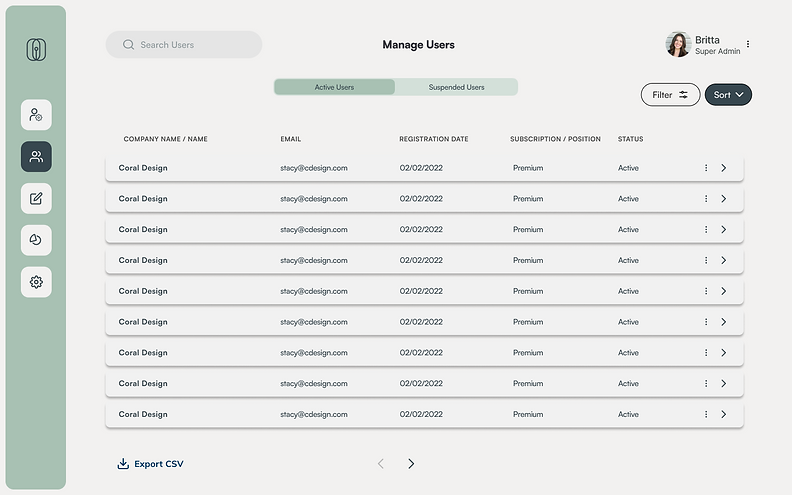
Admins can create, edit, and manage all user accounts across the platform, including professionals, clients, collaborators, and vendors. Each account is assigned a role with specific access permissions, ensuring users interact only with what’s relevant to them. The system also allows for manual overrides, support interventions, and account recovery—all from a clean, intuitive dashboard.
3 / Platform Monitoring & Insights
A built-in analytics and activity log helps admins monitor system usage, user engagement, and platform health. From tracking project creation trends to monitoring storage and media uploads, these tools give the team visibility into how the product is being used—and where improvements are needed. This supports proactive decision-making and continuous improvement at the platform level.

Outcome & Reflections
1 / Role-Centric Experience
Designing distinct user journeys for designers, contractors, and clients helped reduce friction, clarify responsibilities, and improve collaboration efficiency across project phases.
2 / Responsive Design Thinking
One of the key challenges was creating seamless layout transitions across mobile and tablet views. This process deepened my understanding of responsive systems and prioritizing content hierarchy across devices.
3 / Data-Driven UX
I learned how to define and design meaningful analytics dashboards to track user engagement across different roles. These metrics are designed to inform future iterations and gave stakeholders visibility into feature performance.
"Melisa used her amazing talent to take what was only an idea in my head and transformed it into a real and tangible design. She was incredibly thoughtful in how she went about understanding the purpose of the app and how users would flow through it to create an easy-to-use experience. Her graphic designs skills are also exceptional and she created a brand that I can be proud to represent."

Jackie Gusic
Founder of CollabMind